Doing the same as I did previous for the All The Small Things section of the title sequence, I did it for the Adam's Song section as well. I prefer this method of sketching out initial ideas to what I did previous because it's just a quick and simple way to get what I'm visioning out of my mind - which is something that's not always easy to do.
I concentrated a lot more on the sections of this song and sketched ideas for each as the song goes on. I think it's good to have the different ideas near to each other rather than all be separate for each section as it's a lot easier to flick your eyes between and vision which could potentially work the best.
To produce my title sequence, I have decided to have a slightly different approach as to what I have done previously. Before I sketched down an initial idea quickly, then storyboarded up the idea. Instead, I am going to sketch down initial ideas, but not keep them separate, like if I can think of a few ideas for the same section I will just draw them out rather than wait for another idea to do them.
Here's the initial ideas sketched I produced for the song All The Small Things that will be used in the sequence.
I found that doing the initial ideas this was was a lot more productive, and it felt a lot more beneficial as I weren't just thinking of stuff for the sake of it, and I got ideas down straight away before forgetting them. At this stage they may not necessarily make sense, but I will do this for the other songs first.
My initial thought as to how the title sequence could work is to have the countdown timer to take 10 seconds, and then choose 5 of the 10 second clips I have of the songs for the top ten list. This would work hunky dory, but as I discovered with the I Miss You TV Ident, my timings could be fractions of seconds out, so I have decided to choose 4 different songs instead, and select 1 or 2 that could work longer than 10 seconds to include in the sequence - this way it will seem less structured then too.
After listening to each of the clips countless times, keeping in mind the thought that I don't really want to repeat the use of songs that I have already used, I have decided that the 4 songs I will use within this sequence are All The Small Things (13 second clip), Adam's Song (10 second clip), What's My Age Again (16 second clip) and The Rock Show (10 second clip).
Now that I have scrapped the last idea that I came up with for my title sequence, I need a new one to produce instead. I am glad that I realised that I needed to change it at this stage rather than when it would be too late to change it. The other initial thought I'd had originally was to include more than one song within the sequence and do the kinetic type for each one, but the thing that was putting me off was actually getting the sound right. Even so, since this we have had the talk with Lorraine about sound and she explained about how you can fade in and out different tracks, which is actually quite simple to do once it's been explained. So using more than one song is now an actual option to choose from.
I don't just want to have one song fade out and a new one fade in as I don't think this will really work in terms of being effective and a good transition between them. Thinking back to my target audience, with it being the fans of Blink that have followed them for years I suddenly got the idea of having something quite 'worn' and 'old'. This then lead to me thinking about the countdown clocks that are used on older films and what not like this one:
I now have the idea to use some sort of times to countdown from 10 to 1 throughout the sequence that could appear between each song to separate them up. Before I make any definite decisions as to the style of the countdown clock, I did a bit of research into the different styles I could consider using.
Using these images for ideas, I sketched down different ideas that I could think of to use for it.
Although it might be effective to use something less obvious for it, I have decided to stick with the circle idea that used to be used in the past on old films. I just like the sort of vintage feel to them and think it will tie in better my my choice of typefaces and colours. I went on to Illustrator and developed this idea trying altering different elements and what not until I found something I thought would work the best.
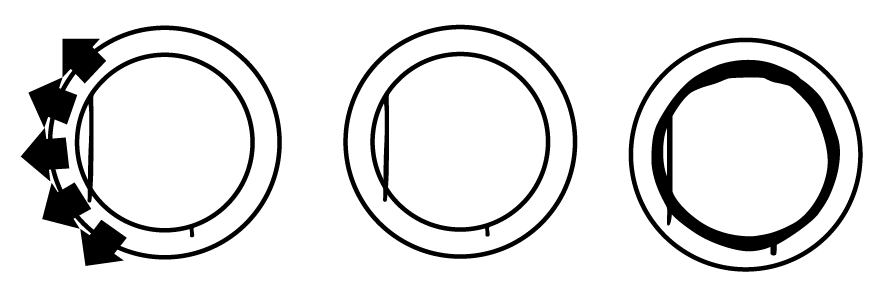
I had drawn in the initial sketches a couple of ideas which incorporated sections of the Blink smiley, which I quickly moved on to experiment with on illustrator. I really like this idea and think it is another subtle element which will help to tie it together better with the Blink theme. I think including the arrows is a bit too much, but I like having the middle section being the middle section to the smiley, so this is the idea I have chosen to use.
I experimented a bit further with this idea, and introduced the number aspect to it, and also decided that I may include the crossed lines like in the examples I found. I will use the other typeface for the numbers instead of the main typeface as I think it works better and sits nicer within the circle. Once I was happy with my decisions, I took the circle over into photoshop, where I developed it further and prepped it up ready to be imported into aftereffects.
I quickly decided the lines would be included with it as I think it just adds that little extra something, as shown above.
I have decided to reverse the colours around so that the background is black and the other elements are grey. It works a lot stronger as a whole being this way around.
I have made the lines look worn in the design, and tried out having the circle look worn too but it didn't really work so I will keep this solid. I am happy with how this now looks and am ready to start getting ideas down now for what will go in the title sequence.
Feeling more confident on aftereffects now, I thought it would be a good idea to 'give it a go' with the 60 second sequence idea I have, baring in mind at this stage I have no prep work really for it, no storyboards or anything and haven't really planned it. Going at it with a 'it can't be that different' attitude, I was soon proved wrong.
Here is where I got up to with the sequence after about 3 hours:
Whilst I do quite like what I have done, I found the process a lot more difficult as I didn't have the storyboards to follow so was having to try and work it out from the illustrator version of the number 10, and it was difficult with some to work out how things should rotate and what not. This has helped a lot with realising the importance of getting how something should move and work down on paper prior to opening aftereffects.
The benefit of doing this, despite the time being spent on it now wasted, I have come to realise that I don't really think it is good enough to do for my title sequence. I'm not entirely sure why I just don't think 60 seconds of that will really be that engaging. It's pretty flat and is only really rotating around, no different sort of effects of anything going on.
So whilst I have just wasted the last 3 hours producing this as I am not going to change what I do do for it, it has probably saved me a lot more time that I would have spent producing the prep work for it. I now need to think of what I can do instead of this. This process was definitely a learning curve in many ways, which I'm glad has happened now.
I am happy with where I am at with the I Miss You ident, so I have decided to leave this for now and come back to it another time. I have found in previous modules that this is highly beneficial to do.
I have reflected back over the ideas and storyboards I have for the Always ident, and have decided to produce this idea:
I have chosen this idea because I like the continuous movement throughout the sequence.
Again, as I explained with the previous post on the I Miss You Sequence, I don't really think it is essential to produce a time line for this as it will be a lot easier to work out the exact frames that each word should appear.
Whilst I was producing the previous ident idea, I tried out using the markers like Lorraine explained that we could do, but it still didn't really line up exact so I found it a lot easier and quicker to play it by ear as to when things should appear and what not, so I will continue this on with this sequence.
I have produced the first half of this sequence. I like how it is turning out, and once I grasped rotating round the words once and then again I found it a lot easier to do, but at first I kept trying to rotate it but couldn't get the key frames right so everything was just all over the place. It takes some patience to get things exactly as I want it to - patience equals time. Again, I will leave this sequence now as I have with the previous one and come back to it later.
Reflecting over the ideas that I have sketched out and storyboarded for the I Miss You TV Ident, the one that I have decided to use is this one:
I have chosen this one as I think it will look the most effective, and push the knowledge of what I have on aftereffects so far, which is what I need to be doing at this stage.
To follow the steps that we took for the previous silent movie brief, I would now need to put my frames on to a time line to understand what will happen when in the sequence. Where I do see the benefits of this, and I did with the previous brief, I think to do this at this point will be a little tricky as I would have to sit and literally work out the exact frame that each of the words are sang in the sequence. I think this will take up a whole lot of time which I shouldn't start wasting. I don't necessarily think it will be a waste of time, it will just be quicker and easier to work out on the actual sequence.
I think because it is literally just the kinetic type that I am using, and not really flicking between imagery or anything it is not necessarily as important as it would be if I was.
So following the talk we had from Lorraine about sound, and how to use it and place the markers, I will import the song and apply the markers to where the words are sang and follow this to put together the sequence. Prior to opening aftereffects though, I produced all of the assets I will be needing in terms of each of the words and what not on Photoshop to then import into after effects.
After a while on aftereffects, here is where I got up to with this ident. I am pleased with my progress as I picked up what I was doing and wanting to achieve quite well. I didn't quite finish it but I am happy with it at this point. This time a few weeks ago I would never have thought I'd have been able to achieve this.
I have pretty much stuck to the storyboards that I produced for this.